Frame Organization
As your canvas grows, organizing frames becomes important for clarity and maintainability. FlowFrame provides controls for layer ordering, visibility toggling, and grouping to help you manage complex workspaces.
Frame Order (Z-Order)
When frames overlap on the canvas, their stacking order determines which frame appears on top. Z-Order controls let you adjust the layering of any frame.
Available Actions
Bring Forward: Move the frame one layer up
Send Backward: Move the frame one layer down
Bring to Front: Move the frame above all other frames
Send to Back: Move the frame below all other frames
How to Access
Method 1 — Hovering Panel: Hover over the frame, click the ordering icon (↑↓), and select the desired action.
Method 2 — Frame Settings: Double-click the frame to open settings → navigate to the Format tab → Ordering subsection.
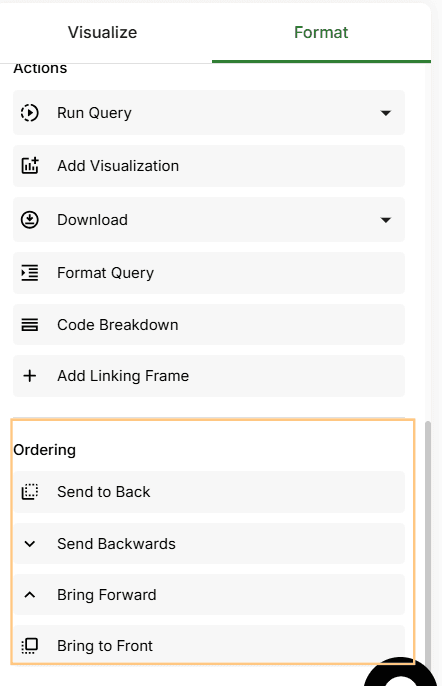
Use Bring Forward, Send Backward, Bring to Front, or Send to Back to control layering
Frame Visibility
You can hide individual frames from the canvas without deleting them or breaking their dependencies. Hidden frames remain fully functional — they continue to update when their upstream dependencies change.
Toggling Visibility
Open the Data Source Panel on the left side of the canvas
Navigate to the Frames section
Click the eye icon next to the frame name to toggle its visibility
When the eye icon is visible, the frame is shown on the canvas. When the eye icon is hidden (slashed), the frame is hidden from the canvas view.
Toggle frame visibility from the Frames section in the data source panel
Frames Grouping
Groups allow you to organize related frames together, move them as a unit, and apply shared formatting like background colors. This is especially useful for separating different areas of your analysis.
Creating a Group
Select multiple frames by holding Shift and clicking each frame, or by dragging a selection box
Click the group icon in the top icon tray
Group Formatting Options
Lock: Fix the positions of individual frames within the group, preventing accidental repositioning
Background color: Customize the group's background to visually distinguish sections on the canvas
Delete: Deletes the entire group and all frames within it at once
Groups let you move, format, and manage related frames together